
Set up filing for Alabama
Provide your Alabama tax account information to set up automated filing.
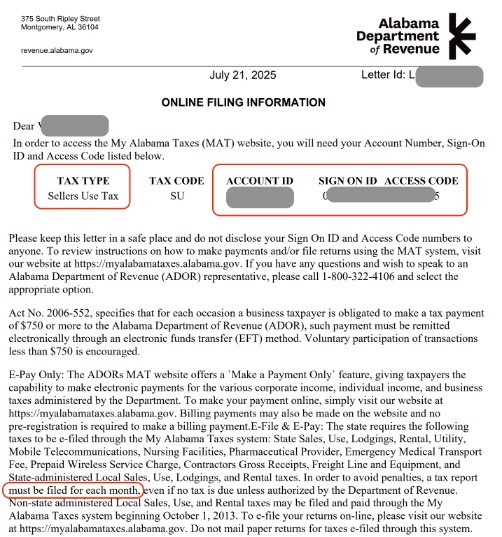
 HINT: Most of this information is in your Online Filing Information letter, mailed to you after registration. To access it digitally in your My Alabama Taxes (MAT) account, go to Correspondence > View/Print Mail > Online Filing Information letter.
Tax registration effective date
- Enter the date your sales tax registration started with the state.
- To find it, check your sales tax permit, mailed to you after registration and available digitally in your correspondence history on My Alabama Taxes (MAT).
- For Simplified Seller's Use Tax (SSU) licenses, search your business name or account number on Alabama's SSU Tax Portal to find your effective date.
Sales Tax ID
- Enter your 14-character state sales and use tax account number.
- It's also listed as your Account ID on your Online Filing Information letter (see above).
License type
- The license type shown on your Alabama tax registration: Standard Sales & Use Tax (SLS or SLU) or Simplified Sellers Use Tax (SSU)
- It's also listed as your Tax Type on your Online Filing Information letter (see above).
License type effective date
- Enter the date this license took effect — typically the same as your tax registration start date, unless you've changed your license type.
- To find it, check your sales tax permit, mailed to you after registration and available digitally in your correspondence history on My Alabama Taxes (MAT).
- For Simplified Seller's Use Tax (SSU) licenses, search your business name or account number on Alabama's SSU Tax Portal to find your effective date.
Sign-on ID
- You received this sign-on ID from the state when you registered for your sales tax license.
- It's also listed on your Online Filing Information letter (see above).
Access code
- You received this access code when you registered for your sales tax license.
- It's also listed on your Online Filing Information letter (see above).
Third-party password
- Enter the password you set in your My Alabama Taxes (MAT) account to allow third-party access.
- To enable third-party access:
- Log in to your My Alabma Taxes (MAT) account.
- Go to Manage My Profile, then select Other Actions.
- Under Access Management, select Manage Third Party Access.
- If "Allowed" is set to No, change to Yes.
- Select Set or Update Password and create a password for third-party access (it should differ from your own account password).
- Set default access type as Third Party and File & Pay.
- Click OK to save changes.
Filing frequency
- Enter your filing frequency as assigned by the state or local tax authority. If you’re not sure, contact the tax authority.
- It's also listed on your Online Filing Information letter (see above).
What to expect next
After you submit your filing application and give TaxJar third-party access to file for you, here's what will happen:
- Under review: Within a few days, TaxJar will review your submission for accuracy and process your application.
- IMPORTANT: Your TaxJar account is created using the email address associated with your Stripe account, so if the TaxJar team needs to contact you, this is the email address we use by default. (Follow these instructions if you want to change this email address within your TaxJar account).
- Filing setup complete: Once TaxJar processes your application, you'll get an email when it's time to review your first filing.
- File your first tax return: When your first filing period is due, you’ll receive an email to review the return before TaxJar submits it.