Set up your Vermont filing

When setting up your Vermont return, you'll need to provide the following information.

If you're unsure about any of this information, check your state sales tax registration certificate or call the Vermont Department of Taxes at 802-828-2551 (hold for the first available agent).

Do you have a physical presence in Vermont?

Physical presence may include: an office, storefront, employee, salesperson, contractor, warehouse, inventory, or trade show attendance.

  • If you answer YES, you'll be asked how many physical locations you have. You’ll then be asked to provide the address for your in-state physical location.
    • Note: TaxJar only supports users who have a single physical location in the state of Vermont.

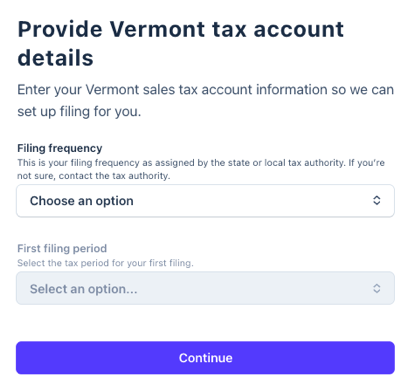
Your Vermont tax account details

You'll need your sales tax registration information, which was provided to you by the state when you received your sales tax permit.

Tax filing frequency

Select the filing frequency assigned to you by the state.

Review and submit

Take a moment to review your filing application. Once you've confirmed that all information is correct, click Submit.


Next step: Give TaxJar third-party access to file for you

After you complete your filing application, follow the steps to log into your MyVTax account to give TaxJar third-party access to your tax account.

Grant accountant or third-party access
  1. Select Grant Accountant or Third Party Access.
  2. Enter Third-Party Username: TaxJar.
  3. Verify the name appears as TPS Unlimited.
  4. Select the Allow only this login to access my account(s) radio button.
  5. Under Account Type Sales & Use, check Add Access.
  6. Select Next.
Sales and use account
  1. For Tax Years, select All Periods.
  2. For access levels, select View, File Returns, and Make Payments.
  3. Check the box to confirm you want to grant access.
  4. Select Submit.


What to expect after that

After you give TaxJar third-party access to file for you, here's what will happen:

  • Under review: Within a few days, TaxJar will review your submission for accuracy and process your application.
    • IMPORTANT: Your TaxJar account is created using the email address associated with your Stripe account, so if the TaxJar team needs to contact you, this is the email address we use by default. (Follow these instructions if you want to change this email address within your TaxJar account).
  • Automatic filing enabled: After access is confirmed, TaxJar will process your application. Then you'll be ready to file.
  • File your first tax return: TaxJar will email you at the beginning of each filing period to  review your return before it's submitted.