
Set up filing for Arkansas
Provide your Arkansas tax account information to set up automated filing.
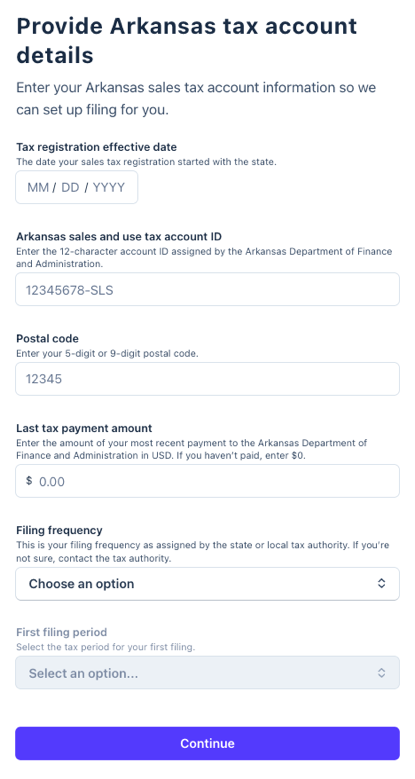 Tax registration effective date
 Tax registration effective date
- The date your sales tax registration started with the state.
- If you have a physical location, this date is listed on the sales tax permit mailed to you by the state. If you're unsure, contact the Arkansas Department of Finance and Administration at 501-682-1895 and provide your Account ID.

Arkansas sales and use tax account ID
- Enter the 12-character account ID assigned by the state.
- Log in to your Arkansas Taxpayer Access Point account. Your Sales and Use Tax ID is listed under the Account Summary section.
Postal Code
- Enter your 5-digit or 9-digit postal code.
- Log in to your Arkansas Taxpayer Access Point account and look for your postal code in the address on the top left of the Welcome page.

Last tax payment amount
- Enter the amount of your most recent payment to the Arkansas Department of Finance and Administration in USD. If you haven't paid, enter $0.
- In your Arkansas Taxpayer Access Point account, go to Payments and Returns and select Manage Payments and Returns. Your last payment is listed under Payments and Posted.

Filing frequency
- This is your filing frequency as assigned by the state or local tax authority.
- Log in to your Arkansas Taxpayer Access Point account and go to View Returns. Your filing frequency is based on how frequently returns are available to file.
What to expect next
After you complete your filing application, here's what happens next:
- Under review: Within a few days, TaxJar will review your submission for accuracy and process your application.
- IMPORTANT: Your TaxJar account is created using the email address associated with your Stripe account, so if the TaxJar team needs to contact you, this is the email address we use by default. (Follow these instructions if you want to change this email address within your TaxJar account).
- Filing setup complete: Once TaxJar processes your application, you'll get an email when it's time to review your first filing.
- File your first tax return: When your first filing period is due, you’ll receive an email to review the return before TaxJar submits it.