
Set up filing for California
Provide your California tax account information to set up automated filing.
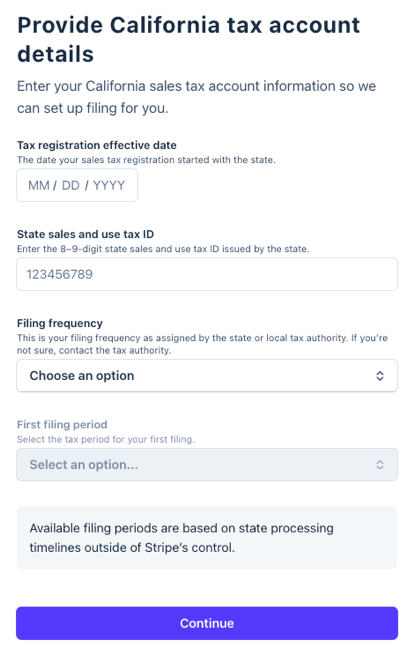
Tax registration effective date
- The date your sales tax registration started with the state.
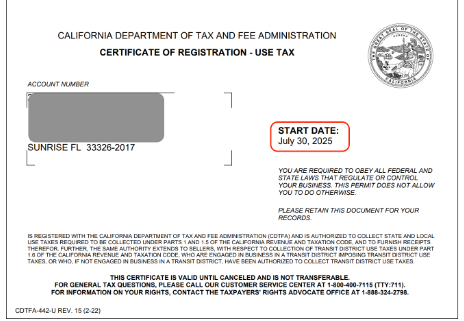
- Log in to your CDTFA online account and go to Locations. Select Print Use Tax Permit. Your effective date is the Start Date listed on your permit.
State sales and use tax ID
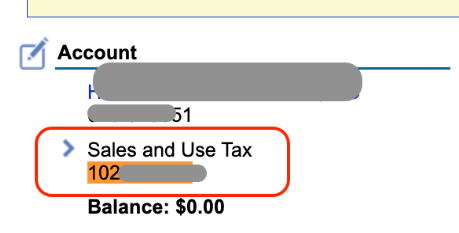
- Enter the 8–9-digit state sales and use tax ID issued by the state.
- Log in to your CDTFA online account. Your California Sales & Use Tax ID is listed in the Account Information section.
Filing frequency
- This is your filing frequency as assigned by the state or local tax authority.Log in to your CDTFA online account. Go to Submissions and open your registration application to find your filing frequency.
What to expect next
After you enter your CDTFA Third Party Access Security Code, here's what happens next:
- Under review: Within a few days, TaxJar will review your submission for accuracy and process your application.
- IMPORTANT: Your TaxJar account is created using the email address associated with your Stripe account, so if the TaxJar team needs to contact you, this is the email address we use by default. (Follow these instructions if you want to change this email address within your TaxJar account).
- Automatic filing enabled: After access is confirmed, TaxJar will process your application. Then you'll be ready to file.
- File your first tax return: TaxJar will email you at the beginning of each filing period to review your return before it's submitted.