
Set up filing for Massachusetts
Provide your Massachusetts tax account information to set up automated filing.
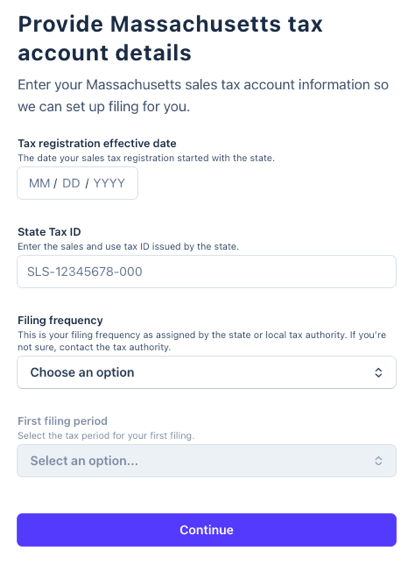
Tax registration effective date
- The date your sales tax registration started with the state.
- Refer to your registration certificate or contact the Massachusetts Department of Revenue at 617-887-6367 to request this information.
State Tax ID
- Enter the sales and use tax ID issued by the state.
- To find it, log in to your MassTaxConnect account and go to the Sales Tax section. Your State Tax ID is listed on the Account tile.
Filing frequency
- Select the filing frequency assigned to you by the state.
- In your MassTaxConnect account, go to the Sales Tax section, and look for your filing frequency on the Account tile.

What to expect next
After you give TaxJar third-party access to file for you, here's what will happen:
- Under review: Within a few days, TaxJar will review your submission for accuracy and process your application.
- IMPORTANT: Your TaxJar account is created using the email address associated with your Stripe account, so if the TaxJar team needs to contact you, this is the email address we use by default. (Follow these instructions if you want to change this email address within your TaxJar account).
- Automatic filing enabled: After access is confirmed, TaxJar will process your application. Then you'll be ready to file.
- File your first tax return: TaxJar will email you at the beginning of each filing period to review your return before it's submitted.