
Set up filing for Georgia
Provide your Georgia tax account information to set up automated filing.
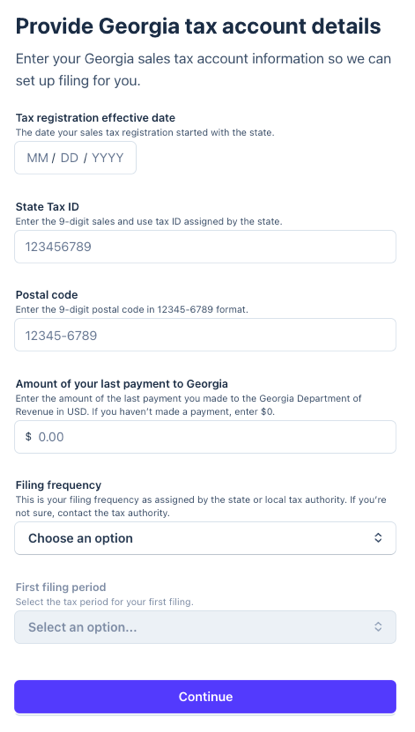
Tax registration effective date
- The date your sales tax registration started with the state.
- To find this date in your Georgia Tax Center account, scroll to the Sales Tax tile, and select Search for a Sales Tax Account to find your business. Your effective date is listed on the Account Details page.
State Tax ID
- Enter the 9-digit sales and use tax ID assigned by the state.
- In your Georgia Tax Center account, scroll to the Sales Tax tile, and select Search for a Sales Tax Account to find your business. Your State Tax ID is the Sales Tax # listed on the Account Details page.
Postal code
- Enter the 9-digit postal code in 12345-6789 format.
-
In your Georgia Tax Center account, scroll to the Sales Tax tile, and select Search for a Sales Tax Account to find your business. Your postal code is listed in the address on your Account Details page.
Amount of your last payment to Georgia
- Enter the amount of the last payment you made to the Georgia Department of Revenue in USD. If you haven’t made a payment, enter $0.
- In your Georgia Tax Center account, go to Payments and Returns > Manage Payments and Returns > Payments and Posted to find your last payment under the most recent pay period.
Filing frequency
- This is your filing frequency as assigned by the state or local tax authority.
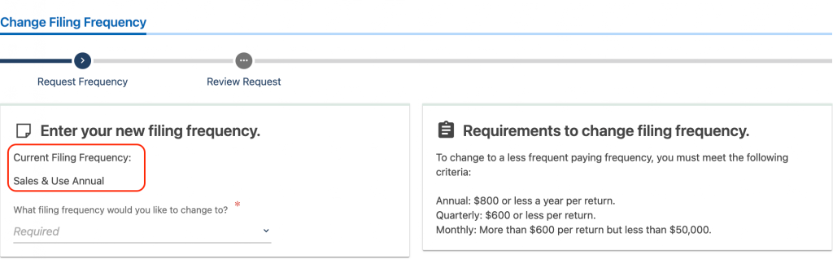
- In your Georgia Tax Center account, go to Account > See More. Under Management, select Change Filing Frequency to view your current frequency.
What to expect next
After you complete your filing application, here's what happens next:
- Under review: Within a few days, TaxJar will review your submission for accuracy and process your application.
- IMPORTANT: Your TaxJar account is created using the email address associated with your Stripe account, so if the TaxJar team needs to contact you, this is the email address we use by default. (Follow these instructions if you want to change this email address within your TaxJar account).
- Filing setup complete: Once TaxJar processes your application, you'll get an email when it's time to review your first filing.
- File your first tax return: When your first filing period is due, you’ll receive an email to review the return before TaxJar submits it.