
Set up filing for Louisiana
Provide your Louisiana tax account information to set up automated filing.
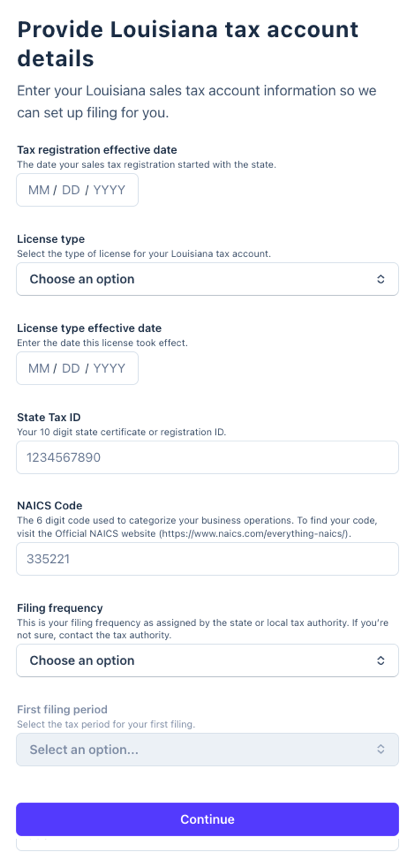 Tax registration effective date
 Tax registration effective date
- The date your sales tax registration started with the state.
- Check your registration certificate or contact the Louisiana Department of Revenue at 855-307-3893 to request this information.
License type
- Select the type of license for your Louisiana tax account: Standard Sales & Use Tax, Remote Seller Tax, or Direct Marketer.
- Your license type appears on your registration certificate and is indicated by the website you use to file Louisiana taxes:
- Direct Marketers use Louisiana Taxpayer Access Point.
- Remote Sellers use RemoteSellersFiling.la.gov.
- Standard filers use the Parish E-File website.
License type effective date
- Enter the date this license took effect.
- Check your registration certificate or contact the Louisiana Department of Revenue at 855-307-3893 to request this information.
State Tax ID
- Enter your state tax ID. The format differs depending on your license type:
- Standard Sales & Use Tax or Direct Marketer: Your 10 digit state certificate or registration ID without dashes.
- Remote Seller Tax: Your 9 digit LA Remote Seller ID including all zeros.
- Check your registration certificate or contact the Louisiana Department of Revenue at 855-307-3893 to request this information.
NAICS Code
- The 6 digit code used to categorize your business operations. To find your code, visit the Official NAICS website ( https://www.naics.com/everything-naics/).
Additional tax account details for your license type:
Standard Sales & Use Tax or Remote Seller Tax
- Username: Your login username for the state tax filing website.
- Password: Your login password for the state tax filing website.
- State account registered email address: The email address associated with your state tax account registration.
Direct Marketer
- Last payment amount: The amount paid to the state on your most recent Direct Marketer return. If you have not yet filed a return, enter $0.
- Where can I find it? In your Louisiana Taxpayer Access Point (LATAP) account, go to More > Payments and Returns > Manage Payments and Returns > Payments and Posted to find your last payment amount.
- Postal code: Enter the zip code listed on your Direct Marketer license registration.
- Where can I find it? In your Louisiana Taxpayer Access Point (LATAP) account, your full business address is listed under the Summary tab on the Account tile.
Filing frequency
- This is your filing frequency as assigned by the state or local tax authority.
- Check your registration certificate or contact the Louisiana Department of Revenue at 855-307-3893 to request this information.
What to expect next
After you complete your filing application, here's what happens next:
- Under review: Within a few days, TaxJar will review your submission for accuracy and process your application.
- IMPORTANT: Your TaxJar account is created using the email address associated with your Stripe account, so if the TaxJar team needs to contact you, this is the email address we use by default. (Follow these instructions if you want to change this email address within your TaxJar account).
- Automatic filing enabled: After access is confirmed, TaxJar will process your application. Then you'll be ready to file.
- File your first tax return: TaxJar will email you at the beginning of each filing period to review your return before it's submitted.